


Sublimation mug interior Merry Christmas + individual box
- A0182


 Shipping 20 EUR, free from 200 EUR


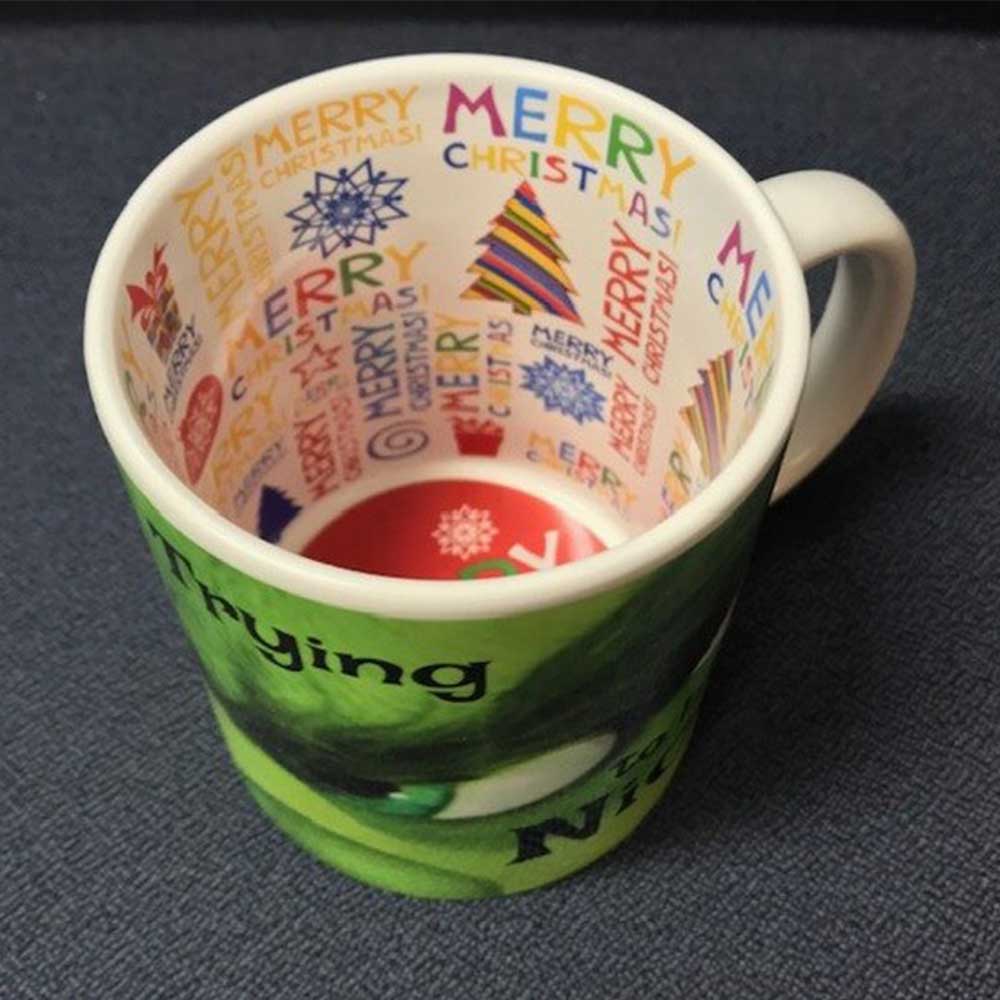
Mug with MERRY CHRISTMAS inside | sublimation | individual box
White ceramic mug with MERRY CHRISTMAS printed inside. The interior message is revealed during use, perfect for Christmas gifts.
The interior has the message "MERRY CHRISTMAS" pre-printed. The white exterior is standard sublimation-compatible, allowing customization with family photos, messages, or Christmas motifs.
Features
| Material | AA ceramic, sublimation quality |
| Capacity | 330 ml (11 oz) |
| Interior message | "MERRY CHRISTMAS" pre-printed |
| Exterior color | White with polymer coating |
| Resistance | Microwave, dishwasher |
| Packaging | Individual box |
Sublimation parameters
Values tested by Green Print for this type of product. It is recommended to test 1-2 pieces before production, adjusting the time by 10-15 seconds as needed.
- Preheat the mug for 10-15 seconds before applying the transfer
- Secure the paper with heat-resistant tape along the entire length
- After pressing, let the mug cool naturally - DO NOT place it in cold water (it may cause microcracks in the coating)
- Remove the paper quickly after the time is up
- The mug must be clean and dry before pressing
Recommended for
Seasonal production from October-December is the most efficient. Combined with family photos, a tree, or personalized messages, it creates a complete themed gift.


Useful articles

Tricolor Products Romania: Guide for Businesses (December 1, Matches, Events)
12 tricolor products in stock, from 1.52 lei each, the calendar of the 8+ moments of the year when they sell, markup calculation, and 3 ready-to-order kits for shops, schools, institutions, HoReCa, and sports clubs.

Festival Bracelets and Party Supplies: The Organizer’s Guide
Textile wristbands from 0.51 lei, numbered paper access wristbands from 0.25 lei, zone-based color system, cost per participant, and ready-to-order kits for festivals, concerts, city days, clubs, and corporate events.

Epson Printer Settings for Sublimation
Step-by-step guide: which settings to use on the Epson printer for sublimation matte paper, Mirror, Adobe RGB, and Gamma 2.2. Plus how to save everything as a preset so you do not have to set the settings every time
Why Green Print
What our customers say
⭐⭐⭐⭐⭐ Reviews from Google · 4.6/5 average from 150+ reviews
See all reviews on Google →